Tuesday, September 11, 2012

App Inventor: Mole Mash


APP INVENTOR TASK THREE: MOLE MASH

The third game I created using app inventor was Mole Mash. To create this game, there are many different components that are needed to insure that this game can be played correctly. 
These components include: 
- canvas 
- image
- label
- button 
- timer 
-noise

The largest part of the screen is taken up by the canvas which enables to the mole (image) to be able to move around in on the screen. By drawing the canvas is enables to restrict the movement of the mole to a certain section of the screen. The image component must be placed inside the canvas component in order for the mole to move around in it. The label is used to show the score (number of times the mole is touched). A noise is used to identify when the mole is hit, a noise can then be heard by the player. The timer component is used to measure the amount of time the mole stays in one spot on the screen. The button that is used is to make the rest button which resets the score. 


The second major step to this game was to create the scripts for the game to work using the blocks editor. 
There are multiple different scripts used to determine the different parts of the game. The first script made is the one that controls the movement of the mole within the screen. The script for the score is also made. It calculates the change in score each time the mole is touched. The timer script is also made to determine what the moles does at each of the time intervals. 
And finally the rest button script is made that sets the score to zero once again. 


The last step was to connect the game into the the mobile emulator. This enabled me to test my game and see if all the scripts and variables worked as they should. 


Monday, September 10, 2012

App Inventor: Magic 8 Ball


APP INVENTOR SECOND TASK: MAGIC 8 BALL:

The first step for creating this app was to add in the components to make this game.
This included an image, text and a sound. 
The image is a button that has had an image to replace the text with.
The text was created using a label that displays the first question asked to the user. This is then placed in a vertical arrangement so that the responses of the eight ball are also displayed in the same area as the question. 

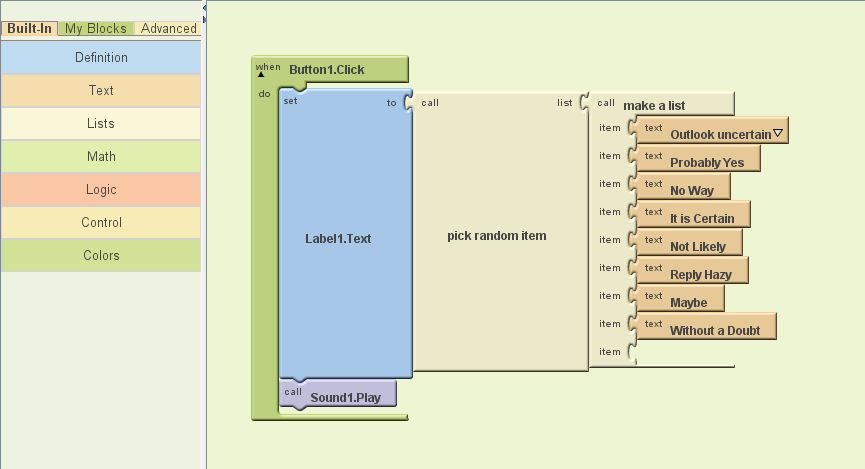
The next step was to open the blocks editor and then add in the commands so that the eight ball displayed an answer when it was clicked.
The eight ball has eight possible outcomes for answers that it can give as an answer. When an answer is given a sound is also accompanied by the response. 


The final step was to connect the app into the app inventor emulator (or android phone) to test this app.


App Inventor: Hello Purr


APP INVENTOR FIRST TASK: HELLO PURR

The first task with making this app was adding in all the components to make the app work. This included adding a image (kitty) as well as text (pet the kitty) and sound (meow). The image of the kitty is a button icon, the text it a label and the sound is a sound component.
The next step was to open the block editor which allowed for the cat to make a sound (meow) when the image was clicked on.  


The final step was to open to created app on either a mobile device or on the mobile emulator. This enabled us to play with the app we had just created. 

Selection and Repetition


Selection and Repetition


As we have mentioned in previous lessons Algorithms are composed of three basic structures. Sequence, Selection and Repetition.

We have already looked at sequence (the single steps in the algorithms we did before are sequence) so what are selection and repetition.

Solving a problem often involves making a decision between two or more options. In an algorithm this process of making a decision is called selection.

Describe, in plain english, an algorithm for;
(you may need to research algorithms in google.
Use the word “if” ie If red then ……)

1.    Moving through a set of traffic lights.
2.    Deciding whether to take an umbrella to school.
3.    Giving a student an A, B or C on their test.

Often an algorithm will often require you to repeat a task in order to solve a problem; when this is done in an algorithm the structure is called repetition.

Describe, in plain english, an algorithm for;

1.    Adding the correct amount of cordial to water to make a drink.
2.    Filling a bucket with water.
3.    Blowing up a balloon.

Remember to post all this in your blog along with any useful links you find in the process.

Monday, July 16, 2012

Flowchart symbols and logic

FLOWCHART BASICS

The site below is excellent for understanding flowchart symbols and logic. (This will be an excellent resource for developing the flowchart required in the assessment!). For today read through the tutorial and post about the following.


1. What is a flow chart? 
Is a means of visually displaying the flow of data 

2. Describe the basic flowchart symbols for: 
  • Start or end of the program:

  • Computational steps of processing function of a program:
  • Input or output operation:
  • Decision making and branching: 
  • Flow line:

3. With the decision making symbol (diamond) and the process symbol (rectangle), what are the rules for how many lines may enter and leave the symbol.

Only one flow line should enter and exit from a process symbol 


Only one flow line should enter a decision symbol, but two or three flow lines (one for each possible answer) should leave the decision symbol. 

4. Study the sample flowcharts then create a flowchart for a coin toss where heads means Mary pays for the pizza and Tales means Bill pays.


What is an Algorithm


Algorithms

What is an Algorithm?

An unambiguous set of steps, which when performed correctly by a processor, will result in a process being carried out in a finite time.

For example if you were to explain to someone how to make a cup of coffee you would be defining an algorithm;

1.   boil the water,
2.   place coffee in the cup,
3.   place sugar in the cup,
4.   add the boiling water,
5.   add milk,
6.   stir.

Examine the algorithm above. What two properties of the algorithm enable it to correctly describe the solution to the problem of making a cup of coffee? What is it that makes an algorithm correct?(Hint: what would happen if you swapped step "6" and step "2"?)
·        It is in the correct sequence.
·        Is very specific to the task at hand.

2.      Define Algorithms for the following processes.

Posting a letter:
1. write the letter on piece of paper.
2. put letter into the envelope.
3. seal envelope
4. write the address of the person you are sending the letter to on the front 
5. stick stamp onto the right top hand corner of envelope
6. write your address onto the back of the envelope
7. walk to post office or post box
8. drop letter into the post office /post box 

Making Toast: 
1. get bread
2. go to toaster 
3. put bread into toaster
4. press leaver on toaster to push toast down
5. wait 2-3 minutes until toast pops up again 
6. take bread out of toaster
7. put desired topping onto toast 

Calling a friend on the cordless land line phone: 
1. Pick up the phone 
2. Dial the number into the phone 
3. Press the green call button
4. Wait for call to connect and the person to pick up 
5. If person doesn't answer the phone repeat steps 1-4 if person doesn't answer
6. Talk to the person

Term 3

Today is the first lesson of term 3.